
Updated September 2026. Eight of the nine products this guide used to recommend can no longer be bought on Amazon, and the Switch 2 has changed what “third-party Joy-Con” even means. We rebuilt the list from scratch: every pick below was checked in stock with a working add-to-cart on September 4, 2026, and prices are current to that day.
Disclosure: As an Amazon Associate I earn from qualifying purchases. Product links in this guide are affiliate links.
Nintendo’s own Joy-Con are small, expensive and, on the original Switch, famous for stick drift. Third-party alternatives fix at least two of those three problems: most now use Hall effect joysticks that do not wear the way potentiometer sticks do, and many cost about half what a first-party pair does. The catch is compatibility. Since the Switch 2 launched in June 2025, the market has split into controllers built for the new console’s magnetic attachment, controllers built for the original Switch’s slide-in rails, and wireless pads that work with both. This guide sorts the best of each by what they attach to, what they can do, and what they cost this month.
Best Third-Party Joy-Cons and Switch Controllers: 2026 Picks Compared
All eight listings verified in stock on Amazon on September 4, 2026. Price and stock for each pick update automatically from Amazon. “Attaches” means the controller physically clips onto the console for handheld play; wireless pads do not.
| Pick | Best for | Works with | Attaches | Sticks | Price | Stock | |
|---|---|---|---|---|---|---|---|
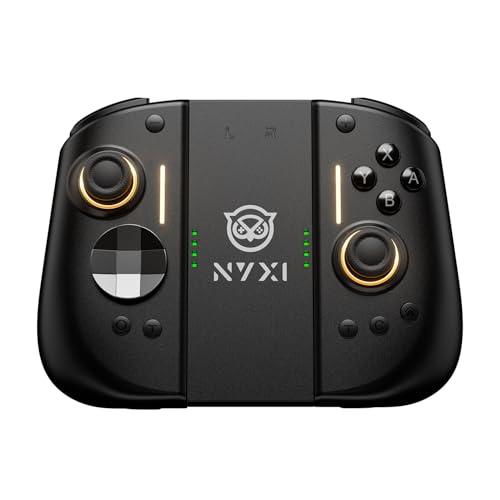 | NYXI Hyperion 3 | Best Switch 2 Joy-Con replacement | Switch 2 | Yes (Switch 2) | Hall effect | $89.99 | In stock |
 | abxylute N6 | Best Switch 2 handheld grip with a C button | Switch 2 | Yes (Switch 2) | Hall effect | $53.99 | Available later |
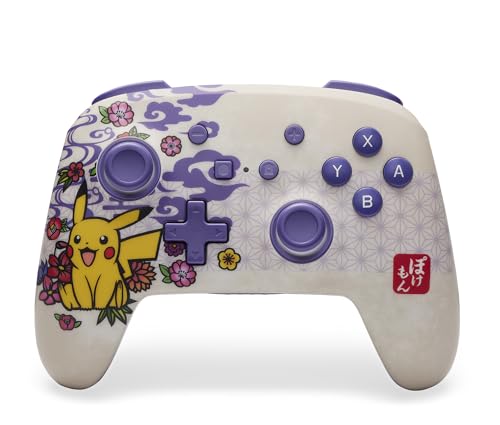 | PowerA Enhanced Wireless | Best officially licensed wireless pad | Switch, Switch Lite, OLED, Switch 2 | No | Standard | $59.99 | In stock |
 | Hori Split Pad Pro | Best big-grip handheld controller for the original Switch | Switch, OLED | Yes (Switch rails) | Standard | $44.49 | Available later |
 | NYXI Wizard | Best GameCube-style Joy-Con for the original Switch | Switch, OLED (Switch 2 by Bluetooth only) | Yes (Switch rails) | Hall effect | — | Unavailable |
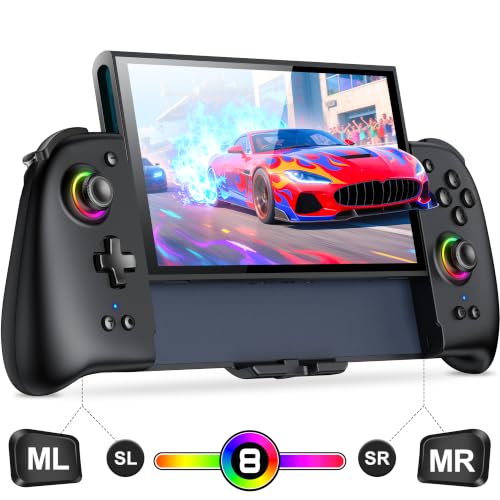 | Gammeefy JC400 Gen 2 | Best budget Switch 2 controller | Switch 2 | Yes (Switch 2) | Hall effect | $42.74 | In stock |
 | 8BitDo Ultimate 2C | Best cheap Bluetooth pad for both consoles | Switch, Switch 2 | No | Hall effect | $31.99 | In stock |
 | NexiGo Gripcon | Best budget handheld grip for the original Switch | Switch, OLED | Yes (Switch rails, wired) | Hall effect | — | Unavailable |
Prices and availability as of 04:09 EDT — details
First, which Switch do you have?
This matters more than anything else on the page. The original Switch and the OLED model use slide-in rails; a controller that clips onto them will not clip onto a Switch 2, which attaches its Joy-Con 2 magnetically and adds a C button for GameChat. The Switch Lite, with its built-in controls, has no rails at all, so only the wireless pads here work with it. Nintendo has confirmed that original Joy-Con can pair with a Switch 2 wirelessly, but they cannot attach to it, and no rail-mounted third-party controller below can attach to it either. If you own a Switch 2, look at the picks marked “Switch 2” for handheld play, or at a wireless pad. If you own an original Switch, the Switch 2 picks will not fit.
1. NYXI Hyperion 3: Best Switch 2 Joy-Con Replacement
Best features: Built for the Switch 2’s attachment system, Hall effect sticks, 9-axis gyro with a magnetometer, full mechanical face buttons.
The NYXI Hyperion 3 is sold on the claim that it was designed for the Switch 2 rather than adapted to it: NYXI calls it the first true second-generation third-party Switch 2 pad. What that buys you is a pair of detachable halves that ride on the new console the way Joy-Con 2 do, with the two things Nintendo’s own controllers still lack: Hall effect joysticks, which sense the stick magnetically and have no contact surface to wear, and mechanical switches under the face buttons. The listing also specifies a 9-axis gyro with a magnetometer, which is a step up from the 6-axis sensors in most rivals for aiming in games that use motion.
Choose this over the abxylute N6 below if you want detachable halves you can hand to a second player and mechanical face buttons. Choose the N6 instead if a single wraparound grip suits you better and you would rather spend $30 less; both have Hall effect sticks. The Hyperion 3 costs about as much as a first-party Joy-Con 2 pair, so the case for it is the stick technology and the buttons, not the price. Its Amazon rating stood at 4.3 stars from 76 reviews when we checked, which is a small sample for a new product; the pair of listings under this name were showing 700+ and 300+ purchases in the past month, so that sample is growing fast.
2. abxylute N6: Best Switch 2 Handheld Grip With a C Button
Best features: Open-top grip that holds the Switch 2, native Switch 2 protocol (recognised as a Pro Controller), dedicated C button, large Hall effect sticks, remappable back buttons, silicone padding.
The abxylute N6 takes the other approach to Switch 2 handheld play: instead of two halves, it is one grip with an open top that the console drops into, with silicone pads where the shell meets the screen. The listing’s two important claims are native Switch 2 protocol support, meaning the system sees it as a Pro Controller rather than a generic pad, and a working C button, which most third-party controllers, including PowerA’s licensed pad below, do not have. You also get Pro Controller-style shoulder buttons and triggers, remappable ABXY, and back buttons.
Choose this over the Hyperion 3 if you play mostly solo in handheld mode and want the biggest, most console-like grip; choose the Hyperion 3 if you need detachable halves or mechanical face buttons. The listing specifies large Hall effect sticks, so you give up nothing on drift. It is the mid-priced way onto the Switch 2, rated 4.4 stars from 169 reviews on September 4.
3. PowerA Enhanced Wireless Controller: Best Officially Licensed Wireless Pad
Best features: Officially licensed by Nintendo, Bluetooth 5.0, rechargeable battery rated up to 30 hours, two mappable back buttons, works with every Switch model including Switch 2.
If “third-party” makes you nervous, the PowerA Enhanced Wireless Controller is the safe pick: it carries Nintendo’s official licence, so it pairs like a first-party pad and is far less likely to be broken by a system update than an unlicensed controller is. It is a conventional full-size wireless gamepad, not a Joy-Con, so it does not attach to any console. The listing rates the battery at up to 30 hours and gives you two programmable back buttons. It is the highest-rated controller on this page, 4.6 stars from 623 reviews when we checked, and PowerA’s design families (Mario, Zelda, Pokémon) are the reason many people buy it.
Two honest limits. The listing states plainly that the C button is not available on Switch 2, so GameChat needs another controller or the touchscreen. And the sticks are standard potentiometer sticks, not Hall effect, so the drift resistance you get from the NYXI, abxylute, Gammeefy, 8BitDo and NexiGo picks is not here. Choose it for the licence and the battery; choose the 8BitDo below if drift-resistant sticks matter more than the licence.
4. Hori Split Pad Pro: Best Big-Grip Handheld Controller for the Original Switch
Best features: Officially licensed, full-size grips, buttons, sticks and d-pad on the Switch rails, assignable rear triggers, turbo, fits in the dock while attached.
The Hori Split Pad Pro has been the default answer to “my hands hurt in handheld mode” since 2019, and with 11,276 reviews at 4.5 stars when we checked, it is by far the most-reviewed product on this list. Each half slides onto the original Switch or OLED rails and gives you a grip, sticks and buttons the size of a home-console pad, plus assignable rear triggers and turbo. It fits in the dock while attached.
Know what it is not. The Split Pad Pro is a handheld-mode controller only: the halves do not detach and work wirelessly, and Hori’s spec sheet lists no rumble, motion sensor or NFC, so games that need those fall back to other controllers. It does not fit the Switch 2. Choose it over the NexiGo Gripcon below for the licence, the larger review base and the full-size grips; choose the Gripcon if you want Hall effect sticks and a $20 saving.
5. NYXI Wizard: Best GameCube-Style Joy-Con for the Original Switch
Best features: Detachable wireless halves on the Switch rails, Hall effect sticks, programmable back buttons, customisable illuminated ABXY, GameCube-inspired layout.
The NYXI Wizard is the closest thing on this list to a true Joy-Con replacement for the original Switch: two halves that slide onto the rails for handheld play and detach to work wirelessly, with Hall effect sticks and programmable back buttons the first-party pair never had. The GameCube-style layout, with the big green A button and kidney-shaped face buttons, is aimed squarely at Smash players. With 4,238 reviews at 4.2 stars when we checked, it has the second-largest review base here.
The listing is unusually clear about its limits, and so should we be: it is slide-in, not magnetic, so on a Switch 2 it works only as a Bluetooth controller and cannot attach. Choose it over the Hyperion 3 if you own an original Switch; if you own a Switch 2, the Hyperion 3 is the equivalent product for your console.
6. Gammeefy JC400 Gen 2: Best Budget Switch 2 Controller
Best features: Switch 2 controller with Hall effect sticks rated for five million cycles, ergonomic grips, 8-colour RGB light rings, 1,000 mAh battery, wake-up function.
The Gammeefy JC400 Gen 2 is the cheapest way to get Hall effect sticks on a controller that attaches to a Switch 2, at under half the price of the Hyperion 3. The listing specifies a five-million-cycle stick rating, a 1,000 mAh battery, palm-filling grips and an eight-colour light ring, and notes that the wake-up function needs a setup step. The Gen 2 sat at 4.4 stars from 584 reviews on the day we checked.
Choose it over the Hyperion 3 if price is the deciding factor and you can live without the mechanical buttons and 9-axis gyro; choose the Hyperion 3 if you want the premium build. Like every unlicensed pad here, it may need a firmware update after a Nintendo system update, and it has no C button claim on its listing.
7. 8BitDo Ultimate 2C: Best Cheap Bluetooth Pad for Both Consoles
Best features: Bluetooth pad for Switch and Switch 2, Hall effect sticks with metal stick rings, non-linear digital triggers, wake-on-shake, 6-axis motion, rumble, turbo, extra L4/R4 bumpers.
8BitDo is well regarded for build quality and firmware support, and the Ultimate 2C is its budget Bluetooth pad. For the money, the listing gives you Hall effect sticks with wear-resistant metal rings, non-linear digital triggers, wake-on-shake so the original Switch turns on from the pad, motion control, rumble and two extra bumpers. It is a conventional gamepad, so it does not attach to either console.
Choose it over the PowerA pad if Hall effect sticks matter more to you than an official licence and you want to spend half as much; choose the PowerA if you want the licence or its 30-hour battery claim. One note from the listing: Switch 2 compatibility depends on keeping the firmware updated through 8BitDo’s app. It was rated 4.4 stars from 775 reviews on September 4.
8. NexiGo Gripcon: Best Budget Handheld Grip for the Original Switch
Best features: Wired rail-mounted grip for Switch and Switch OLED, Hall effect sticks, dual haptic motors, three thumbstick heights, four programmable buttons.
The NexiGo Gripcon is the Split Pad Pro idea with two upgrades Hori does not offer: Hall effect sticks and built-in haptic motors. It connects through the rails rather than wirelessly, which is why it needs no charging and why it is handheld-only. The listing adds three interchangeable thumbstick heights and four programmable buttons. At 4.4 stars from 1,151 reviews on September 4, it is one of the better-reviewed budget options.
Choose it over the Split Pad Pro if drift-resistant sticks and rumble matter and you are happy with a smaller brand; choose the Hori for the licence and the huge review base. It is for the original Switch and OLED only, not the Switch 2.
What Happened to the Old Picks?
Readers who bookmarked this page will notice that almost nothing survived. When we re-checked the previous list on September 4, 2026, three of its nine listings returned Amazon’s “page not found”, three more were marked “currently unavailable”, and two could be viewed but not added to a cart. Only a set of $12 grips was still buyable, and grips are not controllers. That churn is normal in this category: most third-party Switch controllers are made by small brands whose listings come and go within a year or two. It is also why every pick above carries a verification date, and why we would rather recommend eight products we could put in a cart today than a longer list we could not.
Hall Effect Sticks, Explained
Joy-Con drift happens because a conventional analogue stick reads its position through a potentiometer, a physical contact that wears with use until the stick reports movement when it is centred. A Hall effect stick reads position through a magnet and a sensor with no rubbing contact, so the part that wears out in a conventional stick is not there. It is not a guarantee against every cause of drift, but it removes the usual one. Nintendo has not adopted Hall effect sticks in the Joy-Con 2, which is the single biggest reason to consider a third-party controller in 2026. Six of the eight picks above use them. The two that do not are the licensed pads, the PowerA and the Hori.
FAQs
Do third-party Joy-Cons work with the Switch 2?
Only if they were built for it. The Switch 2 attaches its controllers magnetically, so rail-mounted controllers for the original Switch (the Hori, NYXI Wizard and NexiGo above) cannot attach to it, though the NYXI Wizard, the wireless one of the three, can still pair over Bluetooth. The NYXI Hyperion 3, abxylute N6 and Gammeefy JC400 Gen 2 are built for the Switch 2’s attachment system. Wireless pads like the PowerA and 8BitDo work with both consoles.
What is the C button and which controllers have it?
The C button opens GameChat on the Switch 2. Of the picks above, only the abxylute N6 lists a working C button. PowerA’s licensed pad explicitly does not have one, and the other listings do not claim one, so if GameChat matters, the N6 is the pick.
Will an unlicensed controller stop working after a system update?
Sometimes, temporarily. Unlicensed controllers imitate Nintendo’s protocol, and a system update can break that until the maker ships a firmware fix; 8BitDo’s listing says as much about Switch 2 support. Licensed controllers (PowerA, Hori) are far less exposed to it. If you cannot tolerate any downtime, buy licensed.
Are third-party Joy-Cons better than Nintendo’s?
Better on price and, where they use Hall effect sticks, better on drift. Worse, usually, on the extras: most lack NFC for amiibo, some lack HD rumble or the IR camera in the right Joy-Con, and none is guaranteed to keep working through every system update. For most players the trade is worth it; for amiibo collectors and competitive players who need every feature, a first-party pair plus a third-party spare is the usual compromise.
Related Guides
If your Switch shares a TV with a streaming box and a soundbar, our guide to the best touch screen universal remotes covers the remotes that can tidy that up. And if you still carry music on a dedicated player, see the best iTunes-compatible MP3 players.
Product prices and availability are accurate as of the date/time indicated and are subject to change. Any price and availability information displayed on Amazon.com at the time of purchase will apply to the purchase of this product.