

Updated July 2026 — the digital frame market has transformed since our original guide: Wi-Fi frames you load from your phone are now the standard, and prices have dropped dramatically. We’ve replaced discontinued models with today’s best sellers.
Disclosure: As an Amazon Associate I earn from qualifying purchases. Product links in this guide are affiliate links.
Digital picture frames finally deliver on their promise: send a photo from your phone — even from across the country — and it appears on grandma’s mantel seconds later. Here are the best frames you can buy right now, from budget touchscreens to premium gift frames.
The Best Digital Picture Frames — 2026 Picks
| Pick | Best for | Why we picked it | Price | Stock | |
|---|---|---|---|---|---|
 | Aura 10-inch HD WiFi Frame | Best overall / best gift | unlimited free cloud storage, no subscription | $149.00 | In stock |
 | Skylight Frame 10-inch | Easiest for seniors | email photos straight to the frame | $139.99 | In stock |
 | Frameo 10.1-inch 32GB | Best value Wi-Fi frame | app sharing, touch screen | $56.00 | In stock |
 | Dragon Touch 10.1-inch | Best budget | full Wi-Fi feature set | $53.99 | In stock |
 | Frameo 15.6-inch FHD | Best large frame | 1080p on a wall-mountable 15.6-inch screen | $99.95 | In stock |
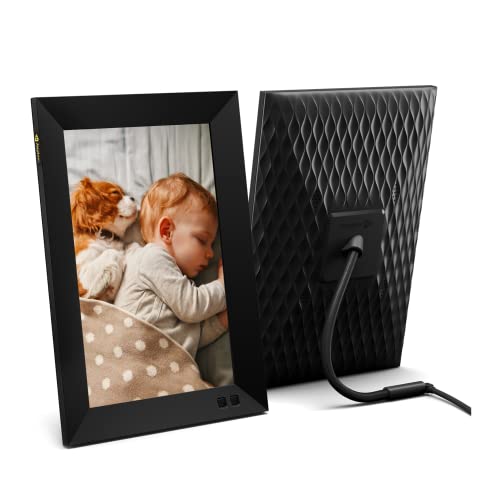 | Nixplay 10.1-inch Smart Frame | Best app ecosystem | playlists, sharing, Alexa support | $179.99 | Available later |
Prices and availability as of 19:28 EDT — details
1. Aura 10″ HD WiFi Frame — Best Overall
Best features: Unlimited free cloud storage, no subscription ever, invite the whole family to send photos, polished app.
Aura wins this category on the thing that matters most: no subscription, ever, with unlimited photo storage. Anyone you invite through the app — kids, siblings, grandkids — can send photos straight to the frame from anywhere. The 10-inch HD display renders photos beautifully with automatic brightness adjustment, and setup takes about five minutes. It’s a premium price, but as a gift that keeps delivering new photos for years with zero maintenance, nothing else comes close. A 4.7-star average from buyers agrees.
2. Skylight Frame — Easiest for Seniors
Best features: Email photos directly to the frame, touch screen, famously simple setup, gift-ready.
Skylight built its reputation on one trick: every frame gets its own email address, and any photo emailed to it appears on screen. No app required for senders, which means even the least technical relatives can participate. The touch screen keeps navigation simple for the recipient too. It’s the frame we’d send to a grandparent who “doesn’t do apps.”
3. Frameo 10.1″ 32GB — Best Value Wi-Fi Frame
Best features: Free Frameo app sharing, 1280×800 IPS touch screen, 32GB local storage, auto-rotate.
Frames running the Frameo app have taken over the mid-market, and this 10.1-inch model shows why: family members install the free app, pair with a code, and send photos with short captions from anywhere in the world. Photos live on the frame’s own 32GB (roughly 40,000 photos) rather than a cloud service, so there’s no subscription and no privacy worry. Touch screen, auto-rotate, and a low price make it the value pick.
4. Dragon Touch 10.1″ — Best Budget
Best features: 1280×800 IPS touch screen, Wi-Fi photo sharing, auto-rotate.
Dragon Touch delivers the full modern feature set — Wi-Fi sharing via app, touch screen, auto-rotation, slideshow controls — at the lowest price of any frame we recommend. Photo quality on the IPS panel is genuinely good. If you want to put frames in three rooms without spending Aura money, start here.
5. Frameo 15.6″ FHD — Best Large Frame
Best features: 15.6-inch 1920×1080 IPS touch screen, 32GB storage, wall-mountable, Frameo app sharing.
On a wall or a mantel across the room, 10 inches disappears — this 15.6-inch full-HD Frameo frame reads like a piece of art instead. Same free app-based sharing and local storage as its smaller sibling, with 1080p resolution that keeps large photos sharp. For bigger budgets there’s also a 64GB version with the same panel.
6. Nixplay 10.1″ Smart Frame — Best App Ecosystem
Best features: Playlists, multi-frame management, motion sensor, Alexa support, polished apps.
Nixplay remains the pick for power users: create playlists, manage several frames from one account (handy if you’ve gifted frames to multiple relatives), and connect photo sources including Google Photos. The motion sensor wakes the frame when someone enters the room, and Alexa voice commands can switch albums. Note that some advanced sharing features now sit behind an optional subscription — the core frame works fine without it.
7. AEEZO 10.1″ — Budget Alternative

Best features: 1280×800 IPS touch screen, Frameo-style app sharing.
Another strong budget option with a 4.6-star average: IPS touch display, app-based photo sending, and simple slideshow controls. Pick whichever of this and the Dragon Touch is cheaper the day you buy.
Buyer’s Guide
Wi-Fi vs USB frames
Modern Wi-Fi frames receive photos through an app or email, which is what makes them work as gifts — you keep sending new photos after you’ve given the frame away. USB/SD-card frames still exist and cost less, but you have to physically load them. For anyone buying a frame in 2026, Wi-Fi is worth the small premium.
Watch for subscriptions
The big differentiator now: Aura and Frameo-based frames are subscription-free; Skylight and Nixplay offer optional paid tiers for extras (video, cloud backup). None of our picks require a subscription for core photo display.
What about battery-powered frames?
True battery-only frames have mostly disappeared from the market — displays that run all day simply need wall power, and most buyers found charging a frame as annoying as charging another tablet. All our picks are mains-powered; if you need to move a frame between rooms occasionally, they’re light enough to relocate and replug in seconds.
Size and resolution
10 inches at 1280×800 is the sweet spot for a shelf; step up to 15+ inches and 1080p for wall mounting or across-the-room viewing. IPS panels (all picks above) keep colors accurate from an angle.
FAQs
Do digital frames need Wi-Fi to work?
Only for receiving new photos remotely. Once photos are on the frame, slideshows run without a connection.
Can family really send photos from anywhere?
Yes — that’s the headline feature of every pick above. Via app (Aura, Frameo, Dragon Touch, Nixplay) or email (Skylight), photos land on the frame within seconds, whether the sender is next door or overseas.
Which frame is best to gift a grandparent?
Skylight if the recipient is deeply non-technical (senders just email photos); Aura if you want the best screen and a no-subscription-forever guarantee.
Product prices and availability are accurate as of the date/time indicated and are subject to change. Any price and availability information displayed on Amazon.com at the time of purchase will apply to the purchase of this product.